cuit
cuit app icon — a glowing purple ring on a dark squircle

Native macOS menu-bar utility

Close Unused Apps Automatically.

Your Mac, always clean and efficient.

Free. Open source (MIT). macOS 13 or later.

First launch: right-click the app and choose Open (ad-hoc signed until v0.2).

Idle rules

Automatically Quit Idle Apps. Your Mac, Streamlined.

Set idle thresholds per app, exclude the ones you keep around, and let cuit clean your workspace while you focus on something else.

  • One idle threshold across every app, with a per-app whitelist
  • Exclude essentials with a single click — Finder, Dock, System Settings preset
  • Quiet background operation, no notifications, no dock icon
cuit Settings window showing the Idle Management pane with a 60-minute threshold and a whitelist of Dock, Finder, and System Settings

Scheduled quit

Quit Apps on Your Schedule.

Set a countdown, walk away. cuit closes selected apps when the timer ends so your machine is ready for the next session.

  • Per-app countdowns with start/stop buttons
  • Quit or hide as the action — your call
  • Daily reset wipes lingering apps overnight
cuit Count Down pane with a Telegram entry counting down 30 minutes before quitting

Menu bar

Lives in your menu bar. Stays out of the way.

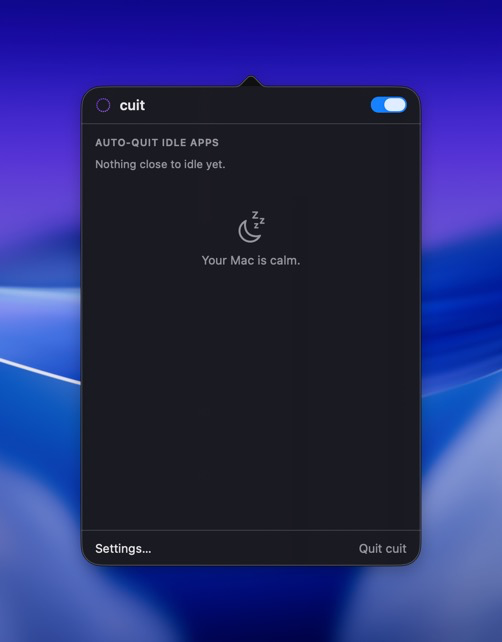
cuit shows a tiny purple ring in the menu bar. Click it to see what is going idle next, peek at your active countdowns, or jump into Settings.

  • Instant peek at near-idle apps and remaining countdowns
  • Toggle the watcher on or off with a single switch
  • Update banner when a new release ships on GitHub
cuit menu bar popover showing Auto-Quit Idle Apps section and a calm-state Your Mac is calm message

Whitelist

Keep essential apps running with full control. Add anything you depend on and cuit will never touch it.

Minimal & Seamless

No clutter, no dock icon. Smart automation lives in the menu bar where it belongs.

Native & Tiny

Built in Swift. About 2 MB on disk. Light on RAM, lighter on attention.